HypeNest
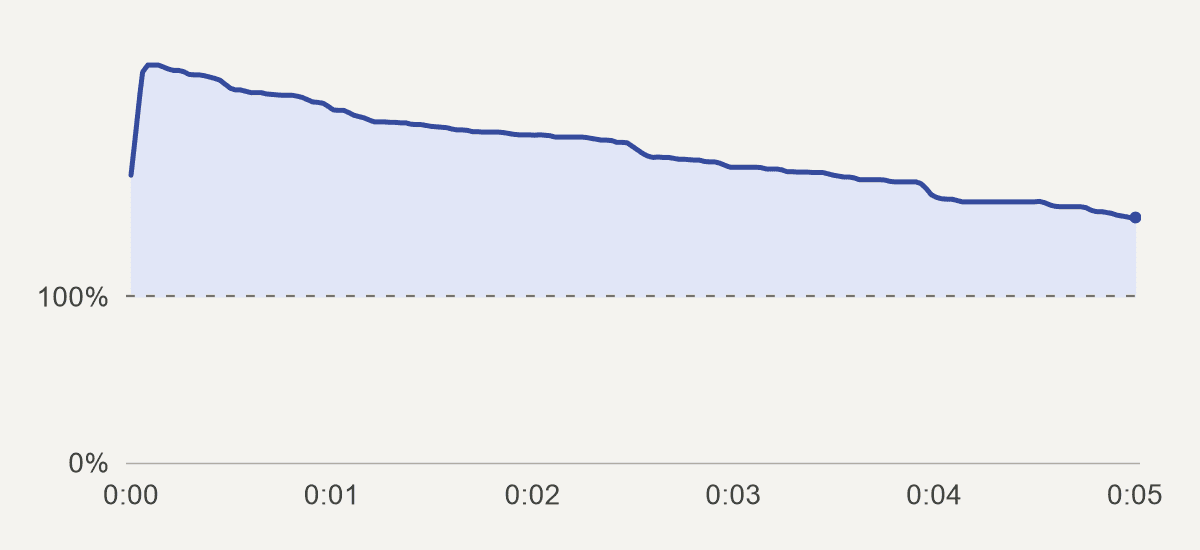
Watch What’s His Jump Distance? once. Where did the jumper’s heels land? Now watch again with your eye on the markings beside his feet. The same six seconds can answer two different questions. Video Performance Lab published the Short’s original YouTube Studio graph, redrawn above.
A six-second jump with nine seconds of viewing
Brian Vs Challenge opens with a question about the jump distance. The athlete jumps onto a marked mat, then the last frame holds on his landing. When the Short restarts, the question comes back while the heel position is still fresh in your mind. You have a reason to look at the mat on the second pass. Watch the Short.
The curve rises highest near the opening and stays above 100% right through the landing. The later frames also got repeat viewing. The graph can show where that happened. Whether someone came back to read the distance, check the technique or simply let it play is their own story.
| In Studio | For this Short |
|---|---|
| Stayed to watch | 71.0% |
| Average view duration | 0:09 on a six-second Short |
| Average percentage viewed | 156.1% |
One jump, three reasons to watch
In one version, the creator asks whether the jumper clears six feet. Watch with one eye on the six-foot line. As soon as you see which side the heels land on, you have your yes or no. Now try the distance question again. Even after you know he cleared the line, there’s still a reason to look down and count the extra inches.
A third version asked whether it was a good jump for a 52-year-old. The mat gives you a distance, but how far would another person of the same age usually jump? To judge that, you would need a comparison the shot can’t provide. The creator reports that some people replayed the six-foot version, while fewer stayed for its opening than for the distance question. These were separate uploads, so the figures alone can’t tell us how much of the difference came from the wording. See the creator’s comparison.
Find the replay on your own retention graph
Open the individual Short
On desktop, open YouTube Studio → Content, select the Short, then open Analytics → Overview and find Audience retention. YouTube says this report usually takes a day or two to process. YouTube’s guide to retention.
Play the moment under the peak
Look at the opening, a point in the middle and the last second. If a spike lines up with a dense caption or a quick demonstration, play that bit at normal speed. Viewers might have wanted a second look or needed more time to read.
Read the average alongside the opening
Average percentage viewed measures the people who stayed past the opening seconds. A 20-second Short with 24 seconds of average viewing would show about 120%. Check “Stayed to watch” separately to see how often people stopped swiping. YouTube’s metric definitions.
Is a replay a sign of interest or confusion?
Suppose you post a paper-folding tutorial. The curve rises four seconds in, where your thumb hides a corner just as you tuck it under the flap. Someone who enjoyed the move and someone who missed it can leave the same mark on the graph. Here’s how to decide what to change.
A peak at the fold
Show the clip once on a phone to someone with a sheet of paper. Can they tell which corner goes under the flap? If they reach for the wrong one, try a closer shot from the folder’s point of view. Keep the rest of the clip at its original speed.
A dip before the reveal
Play from just before the drop. If that’s where your hands leave the frame to fetch another sheet, trim the wait. If the finished shape is already visible there, a viewer may simply have got what they came for. In that case, cutting the folding instructions would remove something useful.
A steady curve through the last frame
If someone can make the fold after one watch and wants to see it again, keep the pause on the finished shape. A smaller replay peak on a clearer tutorial can be a good outcome for the person trying to follow it.
Edit the last second against the first
Put two copies of your clip next to each other on the timeline. Play from the last second of copy one into the opening second of copy two. This lets you see the restart as the viewer does, without scrubbing back to the beginning.
For the jump, keep the freeze long enough to read a mark. Try cutting straight from the heel on the mat to the opening question. Watch once with the sound off to see if you can answer it. Then listen across the cut for a clipped syllable or a jarring change in background sound.
If the peak is on a subtitle in the middle, test a longer hold on that subtitle first. For a dip just before the restart, try removing the pause after the answer. Compare the same moment on your next Short of similar length.
How to compare two Shorts of different lengths
Imagine two Shorts both average 12 seconds of viewing. The first is 10 seconds long, so its average percentage viewed is 120%. The second is 15 seconds long, so it comes in at 80%. The five extra seconds changed the percentage even though the audience spent the same time watching each. Put the duration in seconds beside the percentage before deciding which edit worked.
For your next upload, choose an earlier Short with a similar length, topic and audience. Compare both at the same age, for example after their first seven days. Check where the views came from. A clip found mainly through a search for folding instructions can draw different viewers from one that people encounter in the Shorts feed.
Write down one prediction before opening Analytics. For the paper fold, it could be “With the thumb out of the way, viewers can follow the tuck on the first pass.” Look at the curve around that gesture and see whether people still ask which corner to use. Those observations tell you more about the edit than the overall percentage alone.
Questions about Shorts replays
Does looping help a Short get recommended?
YouTube considers whether people choose to watch, how long they stay and whether they enjoy the Short. A high viewing percentage tells you about the people who stayed. A small audience can replay a clip many times while other viewers swipe past its opening. If reach is flat, look at that opening alongside the retention curve. How YouTube recommends Shorts.
Do loops count as YouTube Shorts views?
YouTube counts a Short starting or replaying as a view. Engaged views count the times viewers stayed past the opening seconds and exclude loops. Subtracting the two also picks up brief starts, so the difference cannot tell you how many times the Short looped. How YouTube counts Shorts views.
Does 156% mean 56% of people watched twice?
It means viewing time averaged about 1.56 times the length of the Short among engaged views. A few people watching a section several times and many people watching it once can produce the same average as another mix of viewers.