
Free Video Caption Generator
Upload a video for free. Get auto subtitles you can style — fonts, sizes, colors, and position — then export without a watermark.
- Auto captions from speech in minutes
- Pick styles, sizes, and colors
- Position captions where they fit
- Export for Shorts, Reels, and TikTok
Sample of the library. More presets inside the app.
Caption looks that read on mute
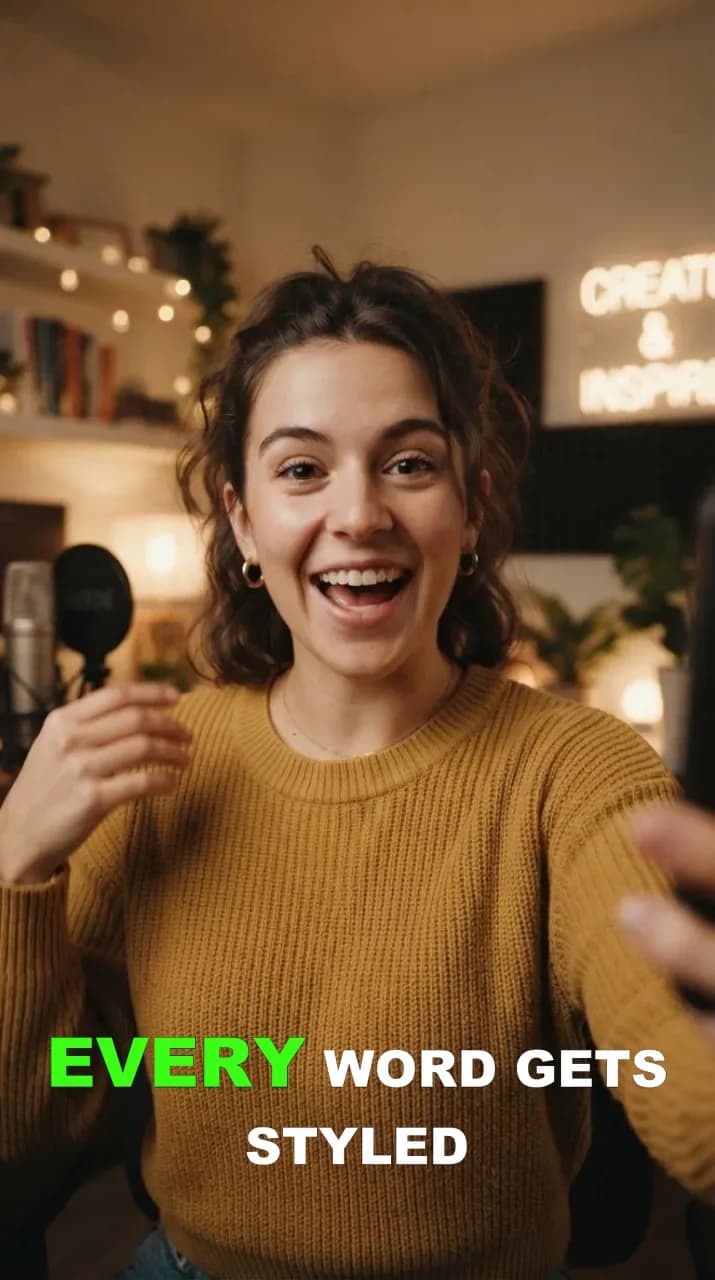
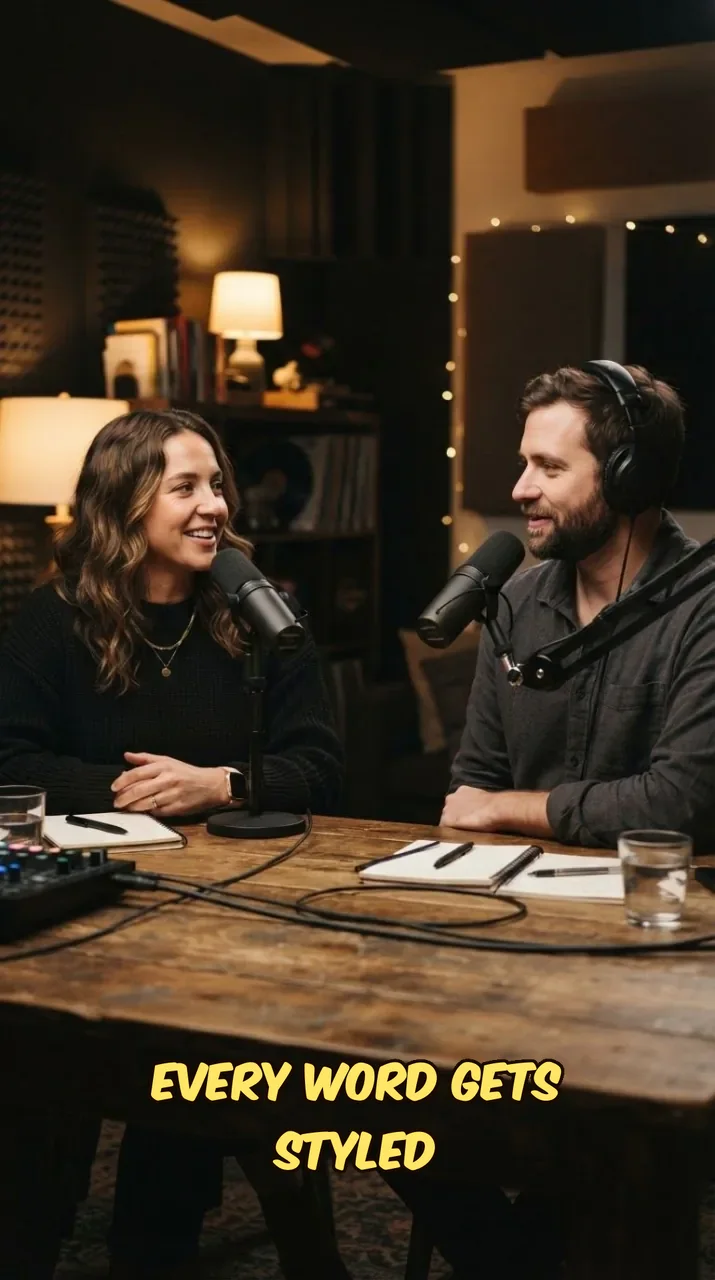
Two of the eight HypeNest caption presets: Karaoke and Comic. Pop, Box, Cinema, Spotlight, Typewriter and Marker complete the set, with custom colors, backgrounds and fonts. See all 8 caption presets
Karaoke
Words fill in green as they are spoken; the rest stays clean white.
- Sized for 9:16 phone frames
- Word timing from the transcript
Comic
Bangers lettering with a heavy outline for punchy hooks and reactions.
- Sized for 9:16 phone frames
- Word timing from the transcript
More presets in the editor
Pop, Box, Cinema, Spotlight, Typewriter and Marker are inside HypeNest too, and the AI style composer builds new looks from a prompt or screenshot.
Three steps to mute-ready captions
From link to burn-in style without a blank timeline.
Paste a public video link
Or open HypeNest and upload a file. No timeline project. A source is enough to draft burn-in captions.
AI writes timed captions
Speech becomes word-level tracks. Pick one of eight presets: Pop, Karaoke, Box, Cinema, Spotlight, Comic, Typewriter or Marker.
Export mute-ready clips
Ship vertical packages with readable type sized for phone screens. No watermark farm branding.
Built for feeds that play without sound
Captions carry the story when audio is off. These settings keep type readable, timed, and on-brand without a four-tile icon grid.
Free video upload
Paste a link or upload a file — no credit card to generate captions.
Karaoke
Comic
Caption style presets
Eight presets, from Pop and Karaoke to Cinema and Marker, or a look built by the AI style composer.
Size & position controls
Scale text for mobile and place captions where they do not cover faces.
Karaoke
Add styled subtitles to any video for free
Learn more
A free video caption generator turns spoken audio into timed, burned-in subtitles so viewers can follow your Shorts, Reels, and TikToks with the sound off. HypeNest lets you upload a video free (or paste a YouTube link), auto-generate captions, then adjust style, size, color, and position before you export — with no watermark on the final file.
Mute-first feeds are the default on mobile. Captioned videos routinely keep people watching longer because the story is readable without headphones. Instead of typing every line on a timeline, you start from an automatic transcript and spend time only on the look: bold outlines, karaoke highlights, minimal white type, brand colors, and safe placement that does not cover faces or product UI.
Style control is what separates a publish-ready clip from a generic auto-caption dump. Font scale for phone screens, high-contrast colors, and bottom-safe positioning matter as much as word accuracy. HypeNest keeps caption settings next to the review step so you can try presets, resize text, and re-export without opening a separate design app.
Creators, podcasters, educators, agencies, and social teams use free auto captions to ship more vertical video without hiring an editor for every post. One upload becomes captioned Shorts and Reels that look intentional — not temporary stubs with default white text and a watermark.
Most people scroll social video with the sound off until something earns a volume tap. If your first three seconds are unreadable, they swipe. Burned-in captions turn speech into on-screen text so the hook still lands when audio is muted.
Platforms also reward watch time and completion. Clear captions help viewers finish tips, quotes, and demos because they can skim while multitasking. Accessibility is a bonus: hard-of-hearing viewers and noisy environments both benefit from accurate subtitles.
Manual captioning is accurate but slow — scrubbing waveforms, splitting lines, and styling every word. A free video caption generator removes that bottleneck so captioning becomes part of publish day, not a multi-hour edit session.
• Mute-first feeds need readable text in the first seconds • Captions lift completion on tips, quotes, and tutorials • Auto speech-to-text replaces hand typing on the timeline • One upload can feed Shorts, Reels, and TikTok exports • No-watermark output keeps captions looking native on your channel
Upload a video file free or paste a public YouTube URL. HypeNest transcribes the speech, times each line, and burns captions onto the frame so you can review them on a vertical preview.
Then you customize. Choose a style preset (bold, outline, karaoke, minimal), set text size for mobile legibility, pick colors or highlights, and move captions up or down so they clear faces, stickers, and product UI.
When the look is right, export without a watermark and publish to YouTube Shorts, Instagram Reels, or TikTok. The same source can also feed clips, titles, and descriptions in the wider HypeNest pipeline if you want a full release package.
• Free upload or paste link — no credit card to start • Automatic speech transcription with timed subtitle lines • Style, size, color, and position controls in one review screen • Vertical preview that matches Shorts and Reels framing • Export captioned video with no HypeNest watermark
Style is not decoration — it is readability. Bold outline captions pop on busy backgrounds. Karaoke-style highlights guide the eye word by word on fast speech. Minimal white captions suit clean talking-head or brand-safe content. Match the preset to the energy of the clip.
Size should be large enough to read at phone width without covering the speaker. If text wraps into three lines every second, shorten phrases or raise size and cut filler words. Position captions in the lower third unless the subject sits low in the frame — then shift them up.
Color and contrast matter on both light and dark backgrounds. High-contrast white or brand accent with a soft shadow or outline usually beats low-contrast pastels. Highlight active words sparingly so emphasis feels intentional, not noisy.
• Bold / outline for high-energy clips and busy B-roll • Karaoke highlights for podcast quotes and rapid speech • Minimal style for tutorials and brand-safe demos • Mobile-first size that stays readable at 9:16 width • Position presets that protect faces and on-screen UI
If your file lives on your computer or phone, upload free inside HypeNest and caption from the source file. This is ideal for local exports, client deliverables, and videos that are not public yet.
If the video is already on YouTube or TikTok, paste the public link for a faster start. HypeNest analyzes the audio, builds captions, and routes you into the same style controls you would get after a file upload.
Either path ends on the same review screen: transcript-aware captions, style tools, and an export path without watermarks. Pick the input that matches how you already work.
Shorts and Reels creators who post several times a week need captions that look on-brand without CapCut every time. Podcasters turning interviews into quote clips need karaoke or outline styles that make spoken lines scannable. Educators need large, clear text so steps stay readable without audio.
Agencies and social managers need consistent caption systems across clients: saved style choices, brand colors, and sizes that do not drift from post to post. Marketing teams caption demos and webinars for vertical distribution without waiting on a design queue.
If you already film talking-head, interviews, or tutorials, free auto captions are the fastest upgrade to mute-first performance. You already have the audio — the missing piece is styled text on the picture.
Accuracy first: fix names, product terms, and numbers the speech model may mishear. A stylish wrong word still damages trust. Read captions at 1x with sound once, then once muted to catch awkward line breaks.
Then check the look. Do captions sit clear of faces? Is the size readable on a phone held at arm's length? Does the style match the brand (or the energy of this specific clip)? Are highlights helping, or distracting?
Finally, confirm export settings: 9:16 for Shorts and Reels, no watermark, and a filename you can find later when batching. Strong captions are a system — same checklist every upload — not a one-off polish.
• Correct names, brands, and numbers before export • Mute test: can you follow the clip with sound off? • Safe margins: captions clear of faces and UI • Style consistency across a multi-clip batch • No-watermark 9:16 export for Shorts, Reels, and TikTok
Manual editors give pixel control but cost time: import media, generate captions, restyle every project, export, re-upload. For weekly creators, that friction is why captions get skipped.
A free online video caption generator optimizes for speed and consistency: auto transcript, preset styles, size and position knobs, and a review-first export. You still edit mistakes, but you are not building captions from zero.
Use HypeNest when you want publish-ready burned-in captions without another subscription or watermark. Reach for a full NLE only when you need multi-track motion graphics beyond subtitle styling.
Definition
What is Video caption generator?
A video caption generator is a tool that transcribes speech from an uploaded video or link and burns timed subtitles onto the picture — often with style, size, color, and position controls — so creators can publish mute-first Shorts, Reels, and TikToks without manual caption editing.
Audiences
Who uses this tool
Shorts creators
Upload free, pick a caption style once, and ship mute-ready vertical clips without CapCut timelines.
Podcasters
Turn spoken quotes into readable clips with karaoke or outline captions in minutes.
Social media managers
Apply consistent caption styles across client accounts without redesigning every post.
Agencies
Batch captioned deliverables with brand colors and sizes approved once per client.
Educators
Make tutorial steps readable on mute so students can follow without headphones.
Marketing teams
Caption demos and webinars for Reels and Shorts without waiting on an editor.
Examples
How creators use free video captions
Talking-head Shorts with bold outline captions for mute-first feeds
Podcast quote clips with karaoke-style word highlights
Tutorial tips with large bottom captions that avoid product UI
Interview highlights with two-speaker colors for clarity
Agency client Reels using brand teal captions on every export
Course teasers with minimal white captions for a clean look
Webinar Q&A moments captioned for LinkedIn and TikTok
Multi-clip batch: same style preset applied across 8 exports from one upload
More tools
Related tools
Caption the video, then package the post:

AI Long-to-Shorts Clip Generator
Paste a YouTube link and turn a long video into Shorts-ready clips with subtitles. No watermark on exports. Review before you publish.

Instagram Reel Caption Generator (AI)
Generate Reel and Shorts captions from your video. Paste a link for hooks, emojis, and hashtags you can edit before post.

AI Content Generator for YouTube
Upload one long video and get clips, titles, descriptions, thumbnails, and publish-ready posts for YouTube and TikTok.
Looking for the product overview? Open the related feature page.
FAQ
Yes. Upload a video or paste a link and generate styled auto subtitles with no credit card required.
Yes. Choose style presets, text size, colors, and position so captions fit your brand and framing.
No. HypeNest exports captioned videos without a watermark so they look native on Shorts, Reels, and TikTok.
Yes. Paste a public YouTube URL for the fastest start, or open HypeNest and upload a video file free.
Eight presets: Pop, Karaoke, Box, Cinema, Spotlight, Comic, Typewriter and Marker. You can adjust colors, font and size, drag captions into place, or describe a new look to the AI style composer.
Yes. Export vertical captioned video for YouTube Shorts, Instagram Reels, and TikTok with styles tuned for mute-first mobile feeds.
Accuracy is strong for clear speech. Always review names, numbers, and niche terms on the review screen before you export.
Yes. Upload longer source videos or paste a link, generate captions, then use the same style settings when you clip or export vertical cuts.
Yes. HypeNest’s free video caption generator exports without a watermark so your subtitles look native on your channel.
Caption any video free
Upload one video. Get auto subtitles with styles, sizes, and colors you control. Export when ready.