
AI Video Repurposing: The Complete Guide 2026
Learn how to use AI video repurposing to turn one long video into multiple Shorts and TikToks. Complete workflow: clip detection, captions, metadata, publishing. This guide covers practical strategies for solo creators and teams alike, with real-world examples and platform-specific tips for YouTube Shorts, Instagram Reels, and TikTok.
If you're still editing Shorts and TikToks one-by-one, you're spending your best creative hours on the slowest part of the job. AI video repurposing fixes that by turning one long video into a repeatable pipeline: find moments, cut clips, format for vertical, add captions, write metadata, publish, then improve what works. The difference between creators who grow and those who burn out is almost always their workflow — and the smartest workflow in 2026 is built around AI-assisted batch processing rather than manual per-clip editing.
This guide gives you a practical workflow you can use every week, whether you're a solo creator, a small team, or a brand trying to post consistently without burning out. We'll cover the tools, the techniques, the quality checks that separate great repurposed content from mediocre output, and the analytics feedback loop that helps you improve your clip selection over time. By the end of this guide, you will have a complete system — not just a list of tools but a repeatable weekly content engine.
What is AI video repurposing?
AI video repurposing is the process of using artificial intelligence to turn one long-form video into multiple short-form clips for Shorts, Reels, and TikTok. It automates clip detection, trimming, auto captions, vertical formatting, and basic metadata, so you can publish consistently without editing every clip from scratch. Instead of spending hours manually scrubbing through a 45-minute podcast looking for shareable moments, AI analyzes the video's audio and visual cues — energy levels, topic transitions, speaker changes, and even keyword mentions — to surface the segments most likely to perform well as standalone short-form content.
Why repurposing works in 2026
Time saved
A long video already contains dozens of 'postable moments.' AI video clipping and templated editing can cut your production time dramatically, especially for podcast-style episodes, tutorials, interviews, webinars, and commentary videos. Where manual editing might take 30-45 minutes per clip — scrubbing through footage, trimming start and end points, reformatting for vertical, adding captions, and writing metadata — AI can prepare a batch of 10-12 clips in roughly the same time it takes to review and approve them.
Instead of starting from zero for each short, you're recycling your best raw material — the hours of recording you already invested are now working harder by generating multiple distribution assets from a single session.
Distribution math — one video isn't enough
One long video is one distribution event. Ten short clips are ten distribution events. And those clips can point back to the original long-form piece, creating a virtuous cycle where your short-form content drives traffic to your longer content and vice versa. The math is straightforward:
- Increases total watch time across your channel by giving viewers multiple entry points into your content library
- Helps more people discover you through different platforms, hashtags, and recommendation algorithms
- Feeds the algorithm with consistent publishing signals, which directly correlates with reach and recommendation frequency
Consistency without burnout
Consistency is hard when every clip is handcrafted from scratch. A content repurposing workflow makes output predictable: record once, publish many. When your publishing cadence is tied to a repeatable system rather than unpredictable bursts of creative energy, you can maintain a steady pace of 3-5 posts per week without the emotional drain that comes from staring at a blank timeline every morning.
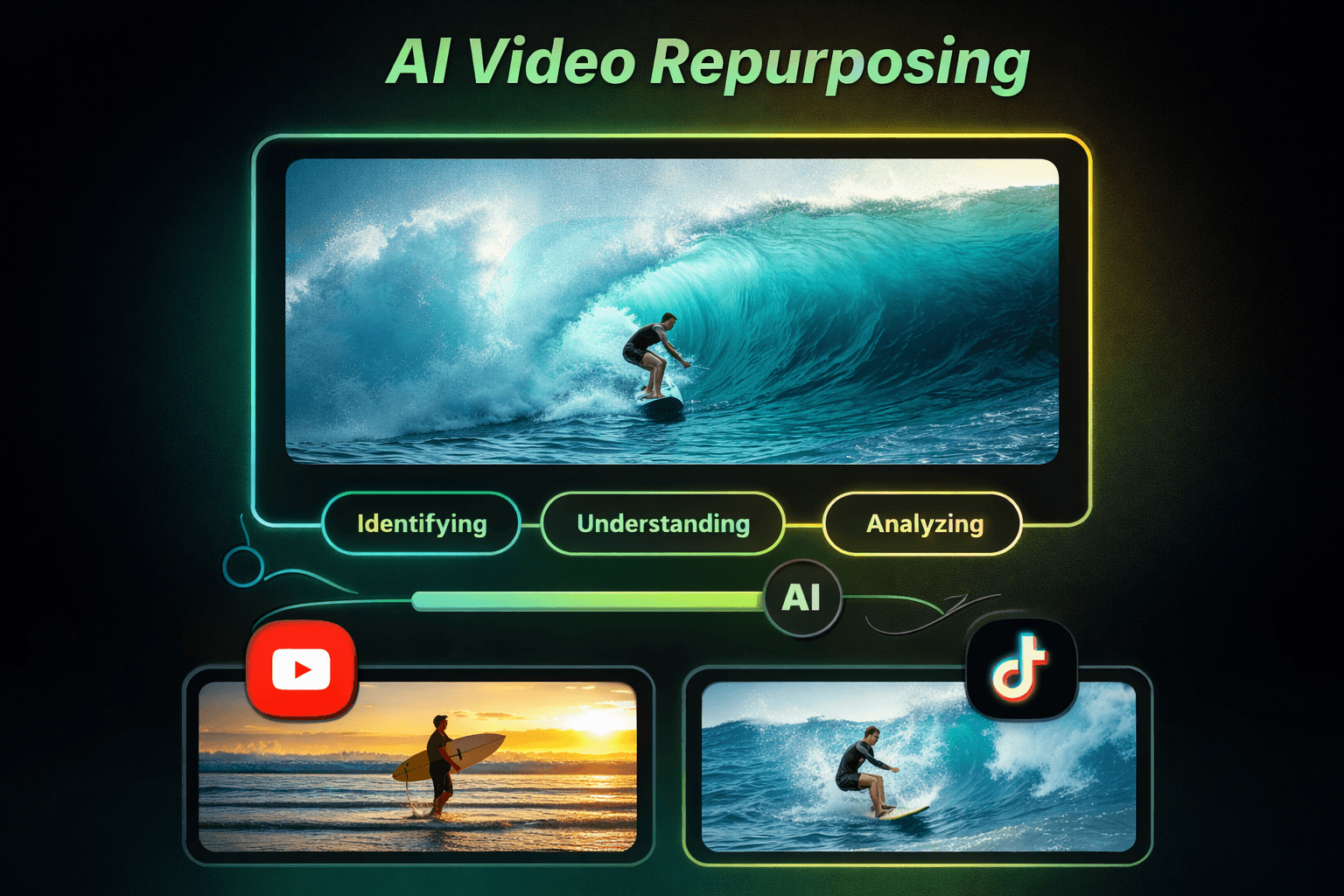
What you can actually expect to ship with AI in 2026
- Clips (long-form to short-form) — AI helps you detect 'high-energy' or 'key point' moments, cut multiple clips in batches, trim dead space, tighten pacing, and automatically reformat for vertical 9:16 aspect ratio. Many tools also offer automatic reframing that keeps the speaker centered even in the original horizontal footage. Start with HypeNest’s free AI clip generator to pull vertical candidates with captions, then review every clip before YouTube or TikTok publish.
- Captions (auto captions) — Auto captions are table stakes now, but good tools also handle punctuation and line breaks, emphasis styling (bold or highlighted keywords), speaker-aware formatting when multiple people are talking, and language detection for multilingual content. The difference between decent captions and great captions is readability — proper line breaks at natural pause points rather than arbitrary character counts.
- Titles — AI can generate multiple hook options — curiosity titles, benefit-first titles, question-based titles, and more — so you can test more angles without rewriting everything from scratch for each clip. The best AI title generators analyze your transcript content and suggest hooks that are contextually relevant rather than generic templates. If you want to generate title variations quickly, try our free tool: AI Video Titles Generator
- Descriptions — Descriptions help discovery and reduce 'out of context' comments because they set context quickly and include searchable phrases naturally. A well-written description also helps YouTube and TikTok understand what your video is about, which improves its chances of being recommended to the right audience. For YouTube Shorts discovery, keywords still matter — use our YouTube Keyword Generator to find terms people actually search for rather than guessing at keywords that may or may not have search volume.
- Thumbnails for Shorts — Thumbnails matter less than for long-form, but they still help in certain discovery surfaces like search results and channel shelves, and when repurposing for platforms that display thumbnail previews in feeds. AI tools can select the most visually engaging frame from your clip and overlay text automatically.
- Scheduling — A good workflow that batches content weekly: generate 8-12 clips in one session (roughly 30-45 minutes including review time), schedule 3-5 posts per week across your chosen platforms, and review analytics every Sunday to decide what types of clips to prioritize in your next batch. The scheduling step is what turns a one-time experiment into a sustainable content engine.
3 Step AI Workflow for Video Repurposing
Choose the source video
Upload the long-form video you want to repurpose — for example, an .MP4 screen recording, podcast, tutorial, webinar recording, or vlog. The best source videos are between 15 and 60 minutes long and contain multiple distinct segments or topic shifts that naturally divide into standalone clips.
In HypeNest:
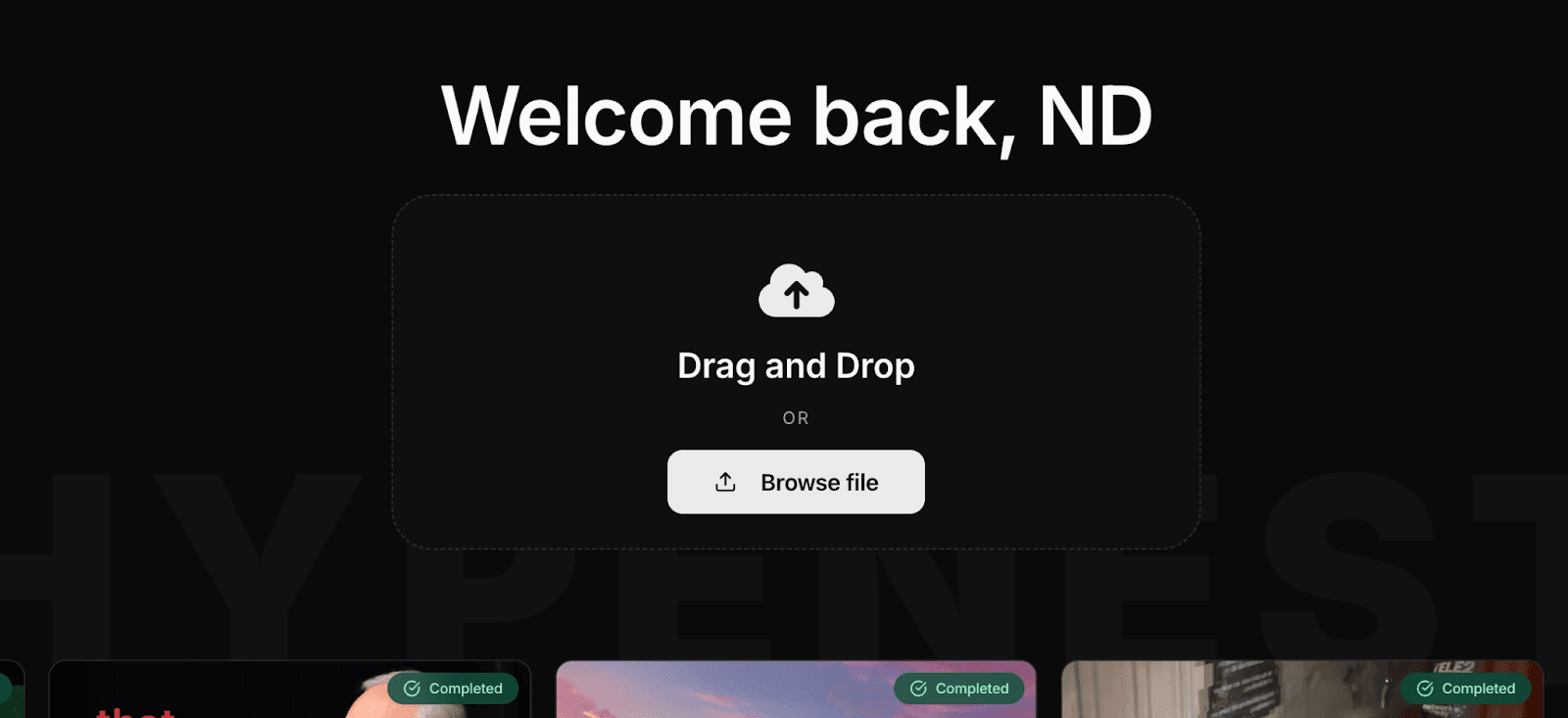
- Drag and drop your file into the upload area or click Browse file to select it from your computer.
- After you select a file, HypeNest shows a quick summary including the duration and file size, so you know what to expect before you commit.
- Click Upload to start processing and wait for the confirmation that your project has been created successfully.
Use AI clipping to detect moments
Open the project you just created after the upload finishes. Your video will appear as a completed project, ready for clipping and publishing setup. The AI will have already analyzed your video and identified potential clip boundaries based on energy levels, topic shifts, and silence detection. Pick the best clip candidates from the generated suggestions. Make quick edits before publishing: title, description, schedule, privacy settings, and tags.
In HypeNest:
- Go to 'All projects.' Look for the card marked Completed and click on it to open the project workspace.
- Correct title, description, privacy, and tags if needed — the AI generates draft metadata, but a quick human pass ensures accuracy.
- Note the label like 'Expires in 2 days' — that's your reminder to publish while the project is still available so you don't lose access to the generated clips.
Schedule your Shorts for publishing
Connect your YouTube and TikTok channels to HypeNest and publish your scheduled content directly from the platform. Not sure when to post? Use our guide Best time to post on YouTube and TikTok to choose a consistent posting window for your Shorts, then refine it based on your own analytics data over the first few weeks. Most channels see the best results posting between 2-5 PM on weekdays, but your specific audience may behave differently.
Popular AI video repurposing tools and how to choose
There are a lot of AI video tools now, and most overlap on the basics: clipping, captions, resizing, and exports. The difference is workflow — how fast you can go from 'long video' to 'scheduled posts' without juggling five different apps and manually transferring files between them. The best tool is the one that minimizes the number of context switches in your pipeline.
Some well-known options people compare include OpusClip, 10LevelUp, Spikes Studio, Vidyo.ai, Klap, ClipGen, and HypeNest. Each has its own strengths — some focus on podcast-style content, some on auto-reframing for landscape-to-portrait conversion, some on multi-platform scheduling. The key is matching the tool's strengths to your specific content format and workflow preferences.
When you're choosing a tool, ask:
- Does it reliably find good moments — or does it just dump 30 random clips and make you sort through the noise?
- How fast can you review and tweak clips before they're ready to publish?
- Can it help you publish consistently, or do you need a separate scheduling tool?
If your goal is a repeatable system, the best setup is usually hybrid: let AI do the heavy lifting — clip drafts, captions, reframing — then do a quick human pass so clips feel intentional and not like randomly generated fragments. The human touch is especially important for the hook moment, title accuracy, and ensuring the clip makes sense as a standalone piece of content.
What Types of Videos Work Best for AI Repurposing
Not all video content is equally suited for AI repurposing. Here are the video formats that produce the best clips, ranked by how naturally they divide into standalone short-form moments that resonate with viewers scrolling through their feeds.
Podcasts and Conversations
Podcasts are arguably the best source material for AI repurposing. A 45-minute podcast typically contains 10-20 distinct moments — hot takes, personal stories, actionable advice, surprising statistics — that work perfectly as standalone short-form content. The conversational format naturally generates emotional peaks, humor, and insights that hook viewers within the first 2-3 seconds.
Tutorials and Educational Content
Tutorial videos are highly repurposable because they are structured around discrete steps or concepts that each work as a standalone tip. A 15-minute tutorial might contain 6-8 individual tips, techniques, or explanations that can each become its own short-form video with a clear learning outcome for the viewer.
Interviews and Guest Segments
Interview content works well for repurposing because the back-and-forth dynamic naturally creates moments of surprise, disagreement, insight, and rapport. Each question-answer pair or tangentially related exchange often contains a complete mini-narrative that works without the surrounding context.
Webinars and Presentations
Webinars typically cover 5-10 distinct topics and include slide changes or visual demonstrations that provide natural clip boundaries. The structured format with clear topic transitions makes it easy to extract individual segments that are self-contained and valuable on their own.
Vlogs and Lifestyle Content
Vlogs can be repurposed effectively but require more curation than structured content formats. The best vlog moments are emotional peaks, unexpected events, and visually striking sequences that capture attention even without the build-up that made them meaningful in the full video context.
Quality Control: The Human Review Step That Makes AI Output Great
The difference between mediocre AI output and excellent content is almost always the human review step. AI can generate a first draft rapidly, but it takes a human eye to ensure each clip feels intentional, coherent, and aligned with your brand voice. This section gives you a systematic checklist for reviewing AI-generated clips quickly without letting quality slip.
Clip Quality Checklist
- Does the clip start at a point that makes sense without context? The first 2 seconds should hook a viewer who has never seen the original video.
- Does the clip end at a satisfying point? Avoid clips that cut off mid-sentence or leave a thought hanging without resolution.
- Is the speaker properly framed throughout the entire clip, or does the auto-reframing drift off-center during movement?
- Are the captions accurate? Verify technical terms, names, numbers, and any industry jargon that speech recognition might have misheard.
- Does the clip deliver on the promise that the title and description imply? If your title says '3 tips for X' but the clip only covers two, the mismatch will hurt retention.
Metadata Quality Checklist
- Does the title include relevant keywords that match what people actually search for in your niche?
- Is the title under 60 characters for YouTube Shorts and under 50 characters for TikTok to avoid truncation in feeds?
- Does the description include a hook, relevant keywords, hashtags, and a clear call to action that tells viewers what to do next?
- Are the hashtags relevant to the specific clip content rather than generic tags that won't help with discovery?
- Does the overall content feel authentic to your brand voice rather than like generic AI-generated filler that viewers can see through?
Review Time Budget
Set a strict time limit for your review process to avoid perfectionism eating into your productivity gains. Spend no more than 2-3 minutes per clip checking the items above. For a batch of 10 clips, your total review session should take 20-30 minutes — any longer and you're defeating the purpose of using AI in the first place.
Advanced Workflow: Building a Weekly Content Engine
Once you are comfortable with the basic three-step workflow, you can upgrade to a more advanced system that produces consistent, high-quality output every single week with minimal daily time investment. This turns content creation from a weekly scramble into a predictable manufacturing process where you know exactly what to do and how long it will take.
The Weekly Production Schedule
Monday: Record your long-form content (1-2 hours of recording, which could be a podcast episode, a tutorial, an interview, or a solo deep-dive). Tuesday: Upload to HypeNest, generate clips, review and select the best ones, write metadata, and schedule posts for the week (30 minutes total). Wednesday through Sunday: Your scheduled YouTube and TikTok posts go live after review while you spend 15 minutes per day on comments and performance.
Sunday evening: Review your weekly analytics — look at which clips had the best retention, which hooks drove the most clicks, and which topics resonated most. Use those insights to decide what to record on Monday (30 minutes).
After 4-6 weeks of consistent publishing, you will have enough data to identify reliable patterns in clip performance — for example, tutorials might consistently outperform hot takes, or clips under 30 seconds might have better completion rates.
Use those insights to adjust your content calendar and double down on the formats, topics, and hooks that your analytics show are working best for your specific audience.
The Content Mix Strategy
From each long-form video, aim for a balanced mix: 2-3 hook clips that tease interesting moments without giving everything away, 2-3 value clips that deliver a complete useful insight or tip, 1-2 behind-the-scenes or personality clips that build connection with your audience, and 1-2 CTA clips that drive viewers to watch the full long-form video or take a specific action.
Using Analytics to Improve Your Pipeline
After 4-6 weeks of consistent publishing, identify correlations between clip types and performance metrics like view-through rate, average watch time, likes, shares, and comment sentiment. Use those patterns to adjust your clip selection strategy — if shorter clips with question-based hooks consistently outperform longer clips with benefit hooks, shift your production accordingly.
Analytics and Performance Tracking for Repurposed Content
Publishing consistently is only half the equation. The other half is knowing which clips are actually working — and using that data to make smarter decisions about what to repurpose next. Most creators skip this step entirely and wonder why their growth feels random. Building even a basic analytics habit transforms your repurposing from guess-work into a feedback loop that gets tighter every week.
The metrics that matter most for short-form content are different from those you'd track for long-form videos. For short clips, focus on completion rate (what percentage of viewers watch to the end), rewatch rate (how often the same viewer watches again — a strong signal for algorithmic promotion), and shares (the highest-intent engagement action, indicating the viewer found the content genuinely useful or entertaining). Likes and comments matter too, but they tend to be lagging indicators compared to completion and shares.
Key metrics to track
- Completion rate: target 60–75%+ for clips under 30 seconds; 45–60% for clips between 30–60 seconds. Anything significantly below these benchmarks usually means a weak hook or a clip that starts too slowly.
- Rewatch rate: a rewatch rate above 1.2x (meaning viewers watch the clip more than once on average) signals strong content that the algorithm will push to new audiences.
- Shares per 1,000 views: this is the clearest signal that your content has genuine utility or entertainment value. Even a 2–3 shares per 1,000 views ratio is considered strong for short-form.
- CTR from short to long: if your short clips include a call-to-action pointing to the full video, track click-through rate to measure how effectively your short content is converting casual viewers into long-form watchers.
Build a simple weekly performance dashboard — a spreadsheet with your clip titles, platform, publish date, completion rate, rewatch rate, shares, and a note on the clip type (hook clip, value clip, personality clip). After 4–6 weeks, sort by completion rate and shares to identify which clip formats and topic categories consistently outperform the rest. Then use those patterns to guide which moments you prioritize in your next AI clipping session.
The goal is not to chase vanity metrics but to build a short feedback cycle: publish, measure, adjust your clip selection criteria, publish again. Creators who do this consistently tend to see compound improvement in their clip quality over time — not because the AI gets smarter, but because the human making the final selection decisions gets smarter.
Building a Sustainable Weekly Repurposing System
The difference between creators who last and those who burn out is almost never talent — it's systems. A sustainable repurposing system removes the daily decision fatigue by giving you a clear protocol: the same steps, in the same order, on the same days of the week. Once that rhythm is established, publishing consistently feels less like creative work and more like running a simple checklist.
Solo creator weekly template
- Monday (60–90 min): Record or acquire your long-form source content — one podcast episode, tutorial, or interview. Aim for 20–45 minutes of recording to give the AI enough material to generate 8–12 clips.
- Tuesday (30–45 min): Upload to your AI repurposing tool, generate clips, review the output, select the 5–7 strongest clips, adjust titles and descriptions, and schedule all posts for the week in one batch session.
- Wednesday–Saturday: reviewed YouTube and TikTok posts go live on their scheduled times. Spend 10–15 minutes per day on comments and early analytics.
- Sunday (20 min): Review the week's performance data. Note which 1–2 clips performed best and what they had in common — hook style, topic, clip length, or format. Carry that observation into next Monday's recording.
For small teams, the model scales naturally. Assign one person as the 'clip curator' (selecting and adjusting AI output), one as the 'metadata writer' (titles, descriptions, hashtags), and one as the 'publisher' (scheduling, channel management). With this division of responsibilities, a team of three can go from 5 clips per week to 20+ without proportional time investment — the AI handles the heavy lifting and the team handles only the judgment calls.
The key principle when scaling is to protect the review step. As volume increases, the temptation is to skip human review and let AI output go straight to publishing. Resist this — a 20-minute review session that catches weak hooks and inaccurate captions will protect your channel's quality reputation in a way that no AI tool can replace. The review is not overhead; it is the quality gate that keeps your content engine producing output you'd actually be proud to have your name on.
Start with 5 clips per week. Once that rhythm feels effortless — meaning you can complete Tuesday's batch session in under 45 minutes — increase to 8, then 12, then 20. Each step up should feel sustainable before you attempt the next. Unsustainable pace is the single biggest reason content creators abandon good workflows.
Repurposing Strategy by Platform: Instagram Reels, LinkedIn, and Twitter/X
Most discussions of AI video repurposing focus on YouTube Shorts and TikTok, but a well-structured repurposing workflow can extend across Instagram Reels, LinkedIn video, and Twitter/X with relatively minor adaptations. Each platform has its own content culture, and the same clip that performs well on TikTok may need a different angle or framing to resonate on LinkedIn. Here is how to adapt your repurposing workflow for each platform.
Instagram Reels
Instagram Reels favor visually dynamic, story-led content. While TikTok rewards raw authenticity and trending audio, Reels tend to perform better when they have a narrative arc — even a very short one. When selecting clips for Reels, prioritize segments that have a clear beginning, middle, and end rather than standalone tips or hot takes. Reels also perform well with trending audio overlaid on the clip, so build this into your repurposing step if your original content is mostly talking-head or screen-share footage. Format requirements: 9:16 vertical, under 90 seconds, with on-screen captions (auto-captions have near-100% penetration on Reels).
LinkedIn Video
LinkedIn is a professional context, which means your repurposing angle needs to shift from entertainment to insight or career utility. A clip about productivity, leadership, industry trends, or lessons learned from professional experience performs significantly better than lifestyle or entertainment content. Subtitles are critical on LinkedIn because most users scroll with audio off. Keep clips between 30–90 seconds. Use a more measured, deliberate pace than you might for TikTok — LinkedIn audiences reward depth over speed. Start each clip with a clear professional insight or a compelling question that speaks directly to someone's career challenges.
Twitter/X Video
Twitter/X rewards punchy, opinion-driven content. The optimal clip length is 30–45 seconds — long enough to make a complete point, short enough to hold attention in a fast-scrolling feed. Strong hooks are even more critical here than on other platforms because the Twitter/X feed is text-heavy and users have developed a strong filtering habit. Pair your video with a sharp text post that teases the main takeaway without giving it all away. Twitter/X video also benefits from a contrarian or counterintuitive angle — something that challenges a common belief in your niche tends to generate more discussion and shares than purely informational clips.
A practical approach: when you generate your weekly batch of clips, tag each one with the platform it's best suited for before scheduling. Not every clip needs to go everywhere — a 90-second tutorial is perfect for LinkedIn but too long for Twitter/X, and a fast-cut emotional moment works on TikTok but needs subtitles and a slower pace for LinkedIn. Matching clip characteristics to platform culture is the refinement that separates mediocre multi-platform distribution from a genuinely effective content strategy.
HypeNest vs. competitors
Most AI repurposing tools can 'make clips.' The real difference is how much work you still have to do after the first draft. HypeNest is built to reduce the annoying parts of the workflow — finding usable moments that have clear hooks and payoffs, keeping the speaker framed correctly throughout the clip, and getting clips ready to publish without bouncing between three different tools for captions, formatting, and scheduling. The goal is to minimize the time between uploading a long video and having scheduled short-form posts ready to go.
- Better clip selection — HypeNest uses scene detection and speaker identification to pull moments that feel intentional — not like chopped-up fragments with awkward start points. That means fewer 'why does this start here?' clips and more segments that actually have a hook plus a payoff, making your short-form content feel complete and satisfying rather than disjointed.
- A smoother path from clips to publishing — HypeNest is designed around a simple flow: upload, generate, pick winners, edit, publish. You can also set publish times inside the project so you're not doing everything manually at the last minute. This means you can batch your entire week's content in one session on Monday and schedule reviewed posts for YouTube and TikTok throughout the week.
- Pricing that's easier to start with — A lot of tools lock the useful features — like auto captions, custom branding, and high-resolution exports — behind higher paid tiers. HypeNest starts with a free plan so you can test your workflow first, verify that the quality meets your standards, and then upgrade when you're posting consistently and need faster processing or higher limits.
HypeNest pricing
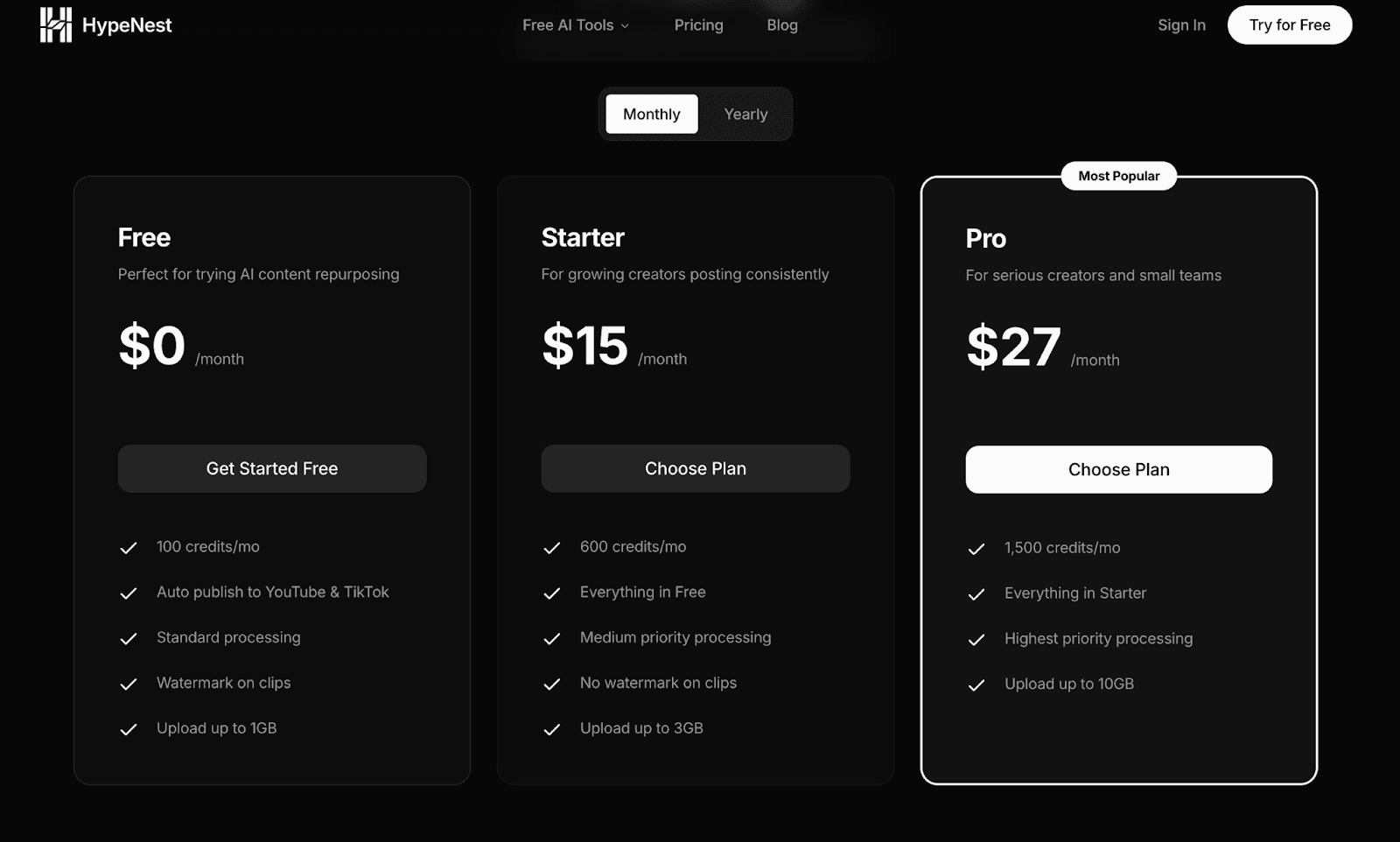
HypeNest pricing starts with a Free plan, so you can test AI video repurposing without paying anything upfront — upload your first videos, generate clips, see if the workflow fits your style. Paid Lite, Starter and Pro plans add more monthly usage, AI dubbing and translation, Clip Agent, AI Vision analysis, scheduling, longer project storage and higher processing priority. Direct publish is live for YouTube and TikTok after you review.
| Plan | Price | Includes | Video processing / month |
|---|---|---|---|
| Free | €0/month | Clips, captions and titles with transcript analysis | ≈ 60 min |
| Lite | €6/month | Everything in Free, plus AI Vision and scheduling | ≈ 300 min |
| Starter | €15/month | Everything in Lite | ≈ 900 min |
| Pro | €27/month | Everything in Starter | ≈ 1,800 min |
+ Bonus: YouTube and TikTok publish after review, on every plan
Frequently Asked Questions
What is AI video repurposing?
AI video repurposing is the process of using artificial intelligence to turn one long-form video into multiple short-form clips for Shorts, Reels, and TikTok. It automates clip detection, trimming, auto captions, vertical formatting, and basic metadata generation. The goal is to maximize the distribution value of every piece of content you create by extracting multiple shareable moments from a single recording session.
How much time can AI video repurposing save?
AI video clipping and templated editing can cut your production time dramatically. A typical workflow generates 8-12 clips in one 30-45 minute session, compared to hours of manual editing where each individual clip would require its own import, trim, caption, and export cycle. Most creators report saving 5-10 hours per week after switching to an AI-assisted workflow.
What types of videos work best for repurposing?
Podcast-style episodes, tutorials, interviews, webinars, and commentary videos work exceptionally well because they naturally contain distinct segments, clear topic shifts, and self-contained ideas. Any content with clear segments, key takeaways, or memorable one-liners is ideal for AI clipping. Educational content and storytelling formats tend to perform best in short-form because they deliver clear value in under 60 seconds.
How is HypeNest different from other tools?
HypeNest uses scene detection and speaker identification to pull intentional moments that have clear hooks and natural conclusions, rather than dumping random fragments that require heavy re-editing. It offers a simple flow from upload to publish with built-in scheduling, and starts with a free plan so you can test before committing to a paid subscription.
Can I publish directly to YouTube and TikTok?
Yes. Direct publish is live for YouTube Shorts and TikTok after you review clips, titles, descriptions, and thumbnails. You can queue reviewed posts. Instagram, Facebook, and LinkedIn are not live direct-publish targets yet.
Final Thoughts
If you want to repurpose video content in 2026 without living inside your video editor, the strategy is simple: build a repeatable workflow. Record once. Generate clips in batches. Choose winners based on your analytics data. Publish consistently on a set schedule. Improve what performs by doubling down on clip types that get the best engagement. The creators who grow are not necessarily the most talented — they are the ones who have figured out how to produce consistently without burning out.
And if you want an easier way to run that workflow end-to-end, use HypeNest for AI video repurposing and keep your content engine moving without the manual overhead that burns most creators out within six months.
Ready to automate your content workflow?
Upload once. Get AI-generated clips, captions, thumbnails, titles, and descriptions in minutes. Publish directly to YouTube and TikTok with one click. Start your free plan today.