
Best AI Clip Generators for Podcasters & Teams
Compare the best AI clip generators by workflow, not hype, and choose the right system for podcasts, educational content, and SaaS video publishing.
Most teams do not need another clip extractor. They need a system that turns long recordings into publish-ready assets with less friction. That is why comparing AI clip generators by feature grid alone usually leads to the wrong choice. The real question is where your workflow slows down after the first draft exists.
Some tools are best when you only care about clip volume. Others are stronger when you also need titles, descriptions, thumbnails, and a publishing plan. The right choice depends on whether you are clipping podcasts, educational lessons, or product content and how much packaging work still happens after the cut.
Quick Answer
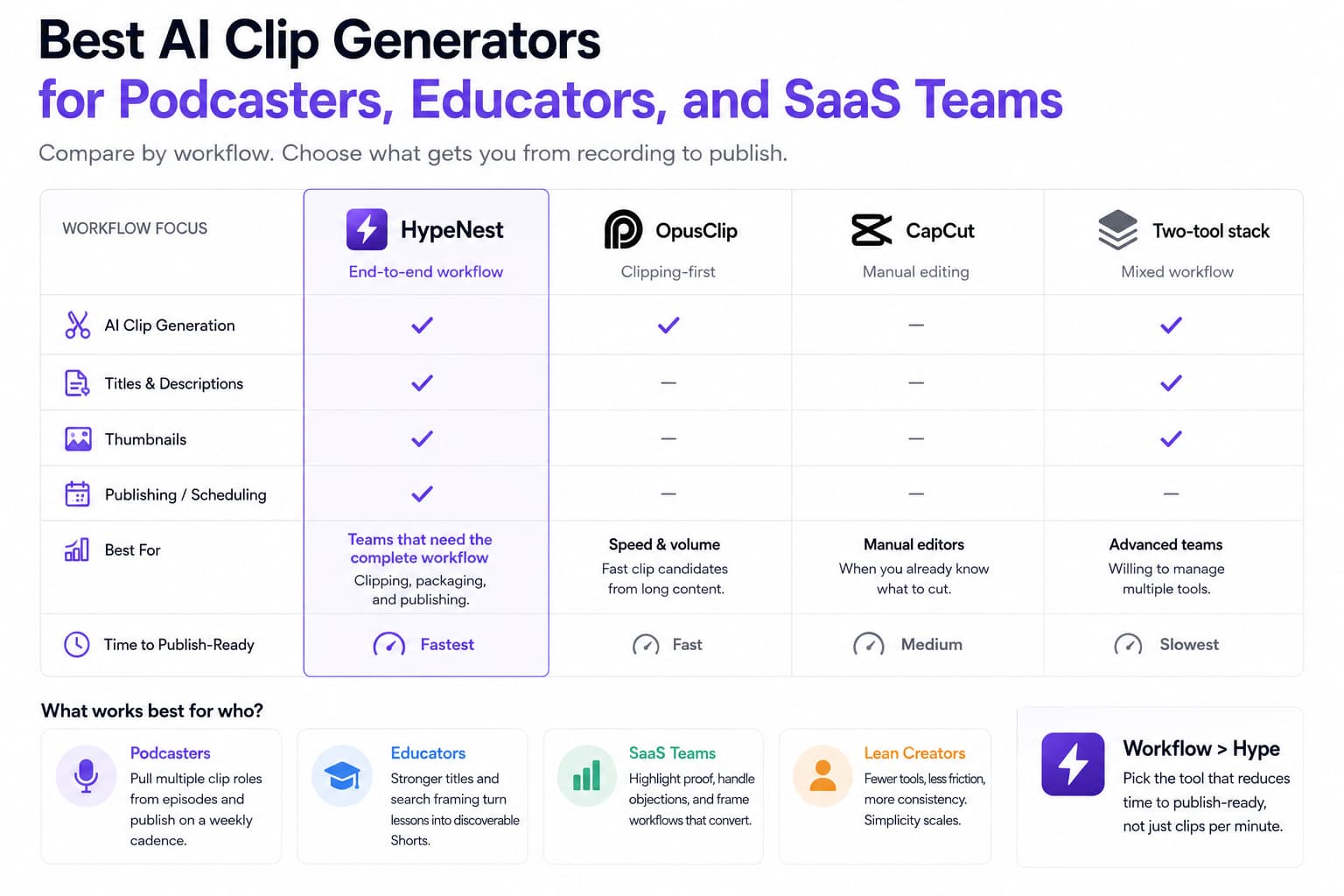
If you need the best all-around AI clip generator for a complete workflow, HypeNest is the strongest fit because it covers more than extraction. It supports clipping, packaging, and publishing from one system. OpusClip is still strong for raw clip generation speed, and manual editors like CapCut remain useful when the team already knows exactly what to cut.
The best choice is the tool that minimizes time from source recording to publish-ready Short. That usually means fewer handoffs and fewer tools, not just faster export time.
How the main options differ in practice
HypeNest
OpusClip
CapCut
A manual two-tool stack
Choose by bottleneck, not by marketing copy
The easiest way to pick the right clip generator is to map it against the part of the process that currently wastes the most time.
- Choose HypeNest if metadata, planning, and publishing are part of the bottleneck.
- Choose OpusClip if your team mainly needs more clip candidates from long recordings, fast.
- Choose CapCut if the real work starts after the team already knows which moments should become Shorts.
- Avoid complex two-tool stacks unless your volume justifies the extra review and handoff cost.
- Measure time to publish-ready clip, not just clips generated per minute.
What works best for each audience
Podcasters
Educators
SaaS teams
Lean creator teams
A practical evaluation framework before you commit
Most evaluation mistakes happen because teams test AI clip generators the same way vendors demo them: one polished source file, one impressive moment, one fast export. Real publishing is messier. Podcasters upload hour-long interviews with overlapping speakers, educators work from screen recordings full of domain vocabulary, and SaaS teams clip webinars, demos, and founder explainers that contain product language the model has never seen before. Before you compare output, list the source formats you actually publish each week and note where clips die today: discovery, trimming, packaging, approval, or scheduling. A tool that looks weaker in a demo can still be the right choice if it removes the step that keeps your weekly batch from shipping.
Next, score tools against output readiness instead of raw highlight quality. A strong candidate clip is only step one. Ask whether the tool gives you captions you can trust, titles that match search intent, descriptions that preserve context, aspect ratios that fit your channels, and project organization that still makes sense when you are running a weekly batch. For educators and SaaS teams, metadata quality matters because viewers often need more framing than pure entertainment clips do. If you still have to rewrite every title and description by hand after export, the tool is not saving as much time as the demo implies. Evaluate the full publish-ready package, not the first attractive cut.
Then test the review loop with real stakeholders. Many teams underestimate how much time disappears after the AI produces candidates. A podcaster may want to veto moments that sound wrong without context. A course marketer may need to confirm that a lesson clip does not overpromise the result. A SaaS marketer may need product or legal approval for any customer claim. If comments, versioning, and handoffs feel awkward, the clipping engine can be excellent and still slow the system down. The right workflow reduces the number of places where context gets lost between editor, marketer, and final approver.
Run one timed trial using an asset you would genuinely publish this week. Start the clock at upload or transcript import and stop only when you have a set of clips with approved titles, descriptions, and destination channels. Count the manual touches: clip replacements, caption corrections, thumbnail edits, folder changes, approval pings, and scheduling fixes. This is the cheapest reality check for vendor claims because it reveals whether the tool accelerates your actual operating cadence or only one isolated step. Repeat the test for at least two source types if your business mixes interviews, lessons, and product footage.
One more screen is consistency across several publishing cycles. A tool can feel magical when an expert operator drives it for one afternoon, then collapse when a teammate tries to repeat the process next week. Check whether the workflow keeps status visible, preserves naming conventions, and makes it obvious why a clip was selected or rejected. This matters for podcasters who batch around recording days, educators who reuse lesson clips across campaigns, and SaaS teams where social, product, and demand generation all touch the same assets. If the system only works when one power user is in the chair, you have not bought leverage. You have bought a dependency.
Finally, compare failure modes instead of chasing perfection. Every system misses nuance somewhere. One tool may over-index on loud emotional moments. Another may crop speakers awkwardly or miss industry terminology in captions. A third may find good clips but produce generic packaging that weakens discovery. Choose the product whose mistakes are easiest to catch and repair inside your current workflow. Predictable errors are cheaper than hidden ones. When a clip generator fits well, the team spends its time upgrading promising assets, not rescuing broken drafts.
How output requirements change by platform and channel
| Item | Details |
|---|---|
| YouTube Shorts | If Shorts is a primary destination, favor tools that help with search packaging as much as visual clipping. Shorts can surface in recommendations, subscriptions, and search, so titles and descriptions keep working long after the first day. Podcasters need clips with enough context to stand on their own, educators need clean phrasing around the lesson, and SaaS teams need obvious product or problem keywords. A generator that produces decent clips but weak metadata usually underperforms on Shorts because discoverability compounds over time. Test whether you can ship a full batch without rewriting every title from scratch. |
| TikTok | TikTok rewards faster iteration and stronger hook density. The best output here is not always the most polished clip. It is the clip that lands the premise instantly and feels native in the first second. Podcasters should emphasize bold statements and reaction moments, educators should lead with the surprising lesson rather than the setup, and SaaS teams should anchor clips around one pain point or one workflow payoff. Evaluate whether the tool surfaces multiple hook angles from the same source and whether captions stay readable on small screens. TikTok exposes weak openings faster than almost any other channel. |
| Instagram Reels | Reels often sits between TikTok speed and Shorts structure. Output needs to look clean enough for a brand feed while still feeling immediate. This matters for educators and SaaS teams that want clips to live beside polished carousels, product visuals, and customer stories. Look for generators that preserve framing, make caption styling easy to review, and support a consistent visual system across a weekly batch. If every clip needs manual cleanup before it feels on-brand, your operating cost stays high. Reels is where packaging quality and aesthetic consistency become visible very quickly. |
| LinkedIn and founder-led distribution | LinkedIn is a smaller-volume channel, but for B2B teams it can produce the highest downstream value. A clip that starts with a clear business problem, product lesson, or market insight can outperform lighter entertainment content even with fewer views. Podcasters using expert interviews, educators selling professional training, and SaaS teams publishing demos should test whether the tool helps them create clips that hold up with sound off, read well in the post copy, and support a strong text-first hook. The best output here feels specific, credible, and easy to repurpose into broader thought leadership. |
| Learning hubs and product education | Not every winning output belongs on a social feed. Educators may want lesson previews for course pages, podcasters may want clip libraries attached to show notes, and SaaS teams may want onboarding snippets for emails, help docs, or feature pages. This is where evaluation shifts from viral potential to reuse potential. Check whether clips stay organized by topic, episode, or campaign so they can be found later, not just exported once and forgotten. A good generator becomes more valuable when its outputs can feed both distribution and owned channels without another round of manual sorting. |

Which tool model fits each team role
| Item | Details |
|---|---|
| Solo host or creator | Solo operators need a tool that minimizes decision fatigue. The wrong system creates dozens of candidates with no ranking, leaves titles blank, and forces the same person to act as editor, strategist, and scheduler. A better fit surfaces a manageable batch, carries context from transcript to clip to metadata, and makes it easy to publish without spinning up a second workflow. Podcasters and educators who work alone should optimize for clarity and throughput, not maximum optionality. When one person owns the whole machine, the best tool is the one that helps them finish the batch on tired days, not the one that looks most powerful in a feature table. |
| Producer or editor | An editor usually cares less about whether AI can replace taste and more about whether it reduces repetitive work. Good fit means fast candidate discovery, clean transcript alignment, reliable caption cleanup, and a straightforward handoff to the person responsible for publishing. Editors working on podcasts or webinars need to move quickly between context-rich long form and short-form cuts without losing narrative continuity. If the tool hides too much control or makes revision history unclear, editors end up fighting the interface. For this role, controllable automation beats fully automatic output almost every time. |
| Educator or course marketer | Education teams care about correctness before virality. A strong tool fit helps preserve the teaching point, avoids misleading truncation, and supports packaging that tells the viewer what they will learn in explicit terms. Course marketers often publish the same lesson in multiple contexts: social clips, landing page previews, email snippets, and in-product education. That means taxonomy and metadata matter as much as the cut itself. The right generator should make it easy to group clips by lesson theme, outcome, or audience level so the team can reuse assets far beyond a single social post. |
| SaaS content or product marketing lead | SaaS teams need clips that can survive scrutiny from sales, product, and leadership. The ideal system helps extract moments from demos, webinars, customer calls, or founder videos and then package them with enough specificity that the message stays useful after editing. This role typically measures clips by downstream value: demo requests, feature understanding, onboarding completion, or sales enablement, not just views. Choose a tool that makes claim review, version control, and campaign grouping simple. When the workflow supports collaboration, the content lead can batch output without creating approval chaos. |
| Small cross-functional team | Many real teams are not cleanly specialized. One person picks clips, another reviews copy, and someone else posts when they have time. For these teams, the priority is reducing handoffs and ambiguity. A tool that combines selection, packaging, and scheduling often beats a best-of-breed stack because it removes coordination overhead. This matters equally for indie podcast networks, small education companies, and startup marketing teams. If everyone touches the process only briefly, the system needs shared visibility, predictable naming, and clear publish status. Team fit is really about operational trust: everyone should know what is ready, what needs review, and what can ship. |
How to think about ROI and migration without breaking production
Establish the baseline cost per publish-ready clip
Migrate one recurring workflow first
Standardize naming, prompts, and approval rules
Phase the archive only after the live workflow works
Look for second-order gains beyond editing time
Review ROI at the batch level, not clip by clip
Routes for deeper evaluation
HypeNest vs OpusClip
HypeNest vs CapCut
HypeNest for Podcasters
HypeNest for SaaS Brands
FAQ
What matters more: clip speed or packaging?
Do all AI clip generators work equally well for every source format?
Should solo teams use multiple clip tools?
How should I evaluate a clip generator before paying for it?
Choose the workflow that actually reduces friction
Use HypeNest to turn long recordings into clips, stronger metadata, and scheduled publishing without bouncing between disconnected tools.