
AI Thumbnail Workflow for Creators
Use a template-first AI thumbnail workflow to speed up design while keeping your Shorts and video covers visually consistent.
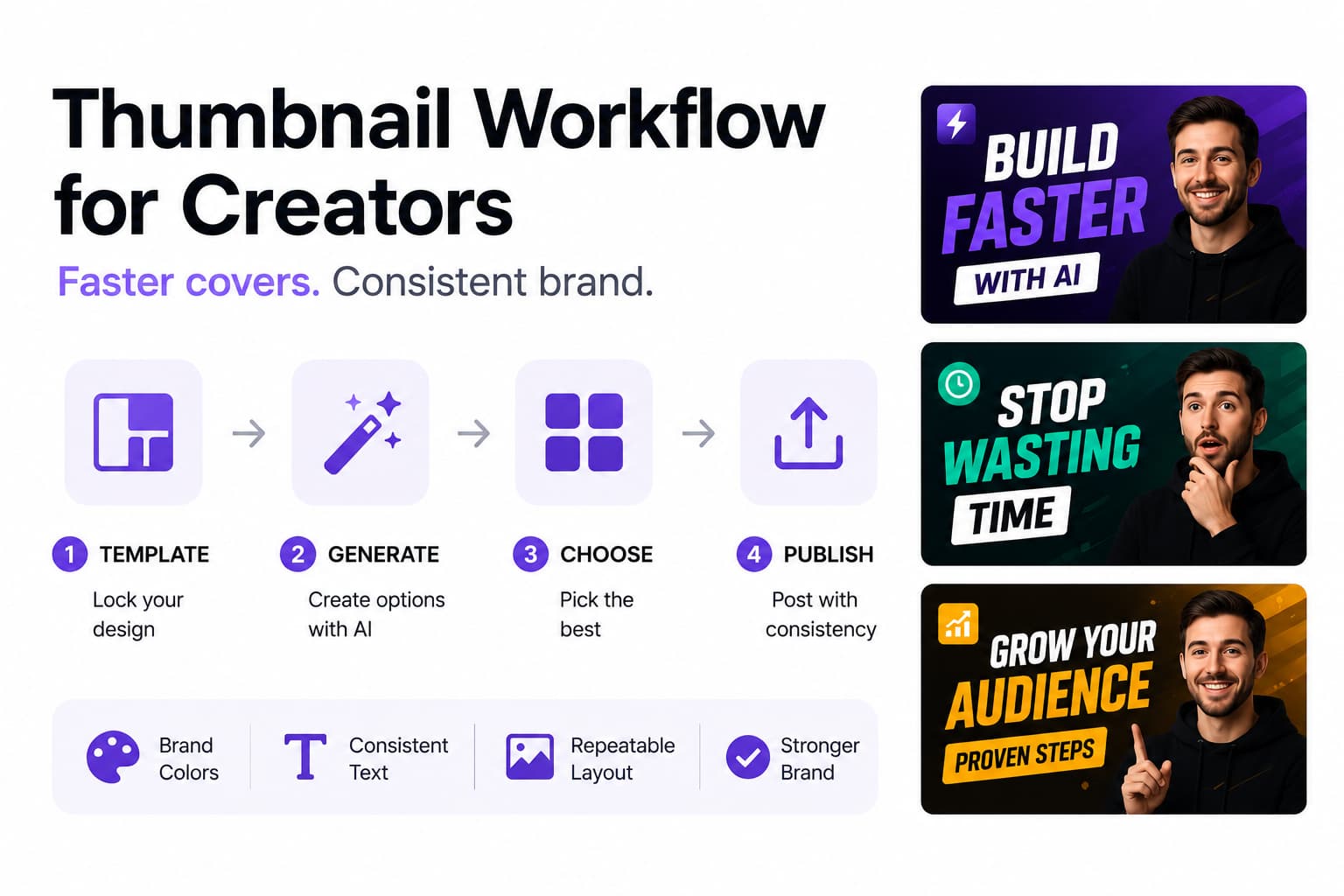
The main risk with AI thumbnails is not that they are slow. It is that they are fast in the wrong direction. If every upload gets a different color system, text treatment, and composition style, the channel starts to feel generic even when the designs are technically polished.
The fix is simple: start with a template, not a prompt. Once the layout, color logic, and text treatment are stable, AI becomes a speed layer instead of a randomizer. That lets creators publish faster without losing the visual identity that makes their content recognizable.
Quick Answer
The fastest thumbnail workflow is to lock one or two brand-safe templates, then generate variations inside those constraints. That creates speed and consistency at the same time instead of forcing a tradeoff between them.
HypeNest supports this because the clip, the title, and the thumbnail workflow sit close together. You can decide the copy promise first, then generate or refine covers that reinforce the same message instead of designing in isolation.
Why a template-first system beats one-off thumbnail prompts
Most thumbnail inconsistency comes from asking the tool to invent the whole design every time. That sounds creative, but it pushes too many decisions into the generation step. A stronger approach is to decide the structure first: color palette, text placement, font weight, image treatment, and how much visual tension the cover should create.
Once those rules exist, AI becomes a variation engine instead of the creative director. That is what makes the workflow scalable. The output can move faster without making the feed feel chaotic.
The parts of a thumbnail system worth standardizing
Color logic
Text treatment
Image or face placement
Accent rules
A practical batch workflow for AI thumbnails
Lock the copy promise first
Generate multiple variations inside one template
Review the whole batch together
Update the template only when analytics justify it

How to run a thumbnail testing workflow that actually teaches you something
A lot of thumbnail testing advice is written for teams with huge traffic, formal experiment tools, and enough impressions to split every decision into perfect A and B variants. Most creators do not work like that. A usable testing workflow is lighter. Keep one control based on your current best template, create one or two challengers from the same title promise, and change only a single visible variable such as text length, face crop, or background contrast. Record what you expect each version to do before you publish. That prediction matters because it forces you to define what the thumbnail is supposed to communicate instead of treating design as decoration.
The best time to catch a weak concept is before the upload goes live. Review every option at phone size, in grayscale, and beside the last ten videos on your channel. Then check it against the videos that currently compete for the same viewer. If the promise disappears when the cover is small, or if the focal point blends into your own recent uploads, the issue is not that AI missed one shadow or texture. The issue is that the packaging hierarchy is unclear. That kind of pre-publish review often saves more time than generating another ten variations because it tells you whether the idea itself is readable.
Once the video is live, look at the results by traffic source before deciding what won. Browse and recommendation surfaces reward immediate emotional clarity. Search often rewards literal clarity and stronger topic labeling. Subscriber traffic behaves differently again because familiarity with your brand reduces the need for explanation. If you judge every thumbnail against one blended CTR number, you will miss the reason a version worked. Compare the result against the right baseline for that format, topic, and traffic mix. Give the upload enough time to stabilize as well. Early impressions are noisy, especially when the first audience segment is unusually warm or cold.
Store the outcome of every test in a simple log, even if the log is just a spreadsheet or note. Capture the date, video topic, title promise, template used, variables changed, source mix, CTR, early retention, and any notes about why you think the result happened. After twenty or thirty uploads, the log becomes more valuable than any single test. Patterns start to repeat. You may notice that tutorial covers win with shorter text, reaction clips win with tighter face crops, or educational uploads underperform when the accent color is too close to the platform background. That is the point where testing becomes a real operating system instead of a sequence of isolated guesses.
A useful testing workflow ends with a decision, not just an observation. Either keep the control, promote the challenger into your default template, or mark the result as interesting but inconclusive. What you should not do is let one lucky winner rewrite your entire style system overnight. System changes should come from repeated signal across several uploads, not from one spike that may have been driven by topic demand. The goal is steady learning. Every test should narrow the number of design questions you still need to answer so the next production cycle gets faster and your creative choices become less random.
This is also why it helps to test inside comparable content buckets. Do not compare a sponsored announcement to an evergreen tutorial and assume the thumbnail caused the difference. Keep your testing calendar aligned with format, audience intent, and publishing rhythm wherever possible. Similar uploads produce cleaner lessons. Over time you build a channel-specific playbook: which ideas deserve bold contrast, which categories can support more text, and which visual moves only look good in the design file but collapse in the feed. That playbook is what turns thumbnail testing from busywork into leverage.
Build a style system AI can follow without flattening your brand
Brand consistency does not mean every thumbnail needs to look identical. It means the channel has a design grammar that survives topic changes, upload frequency, and different people working on the assets. AI tools are much better at following a grammar than following vague adjectives like bold, premium, or clean. The stronger move is to define reusable visual tokens: approved background families, face crop ratios, text line counts, contrast pairs, accent shapes, and the amount of empty space each layout should leave. Once those tokens exist, the tool can generate faster without breaking recognition every time it tries something new.
It helps to separate the system into stable layers and flexible layers. Stable layers are the parts a viewer should recognize almost every time: typography, grid logic, safe margins, subject scale, outline treatment, or shadow style. Flexible layers are what let the channel still feel alive: topic color, supporting iconography, background texture, image source, or a secondary framing device for a series. That split keeps the brand from becoming visually stale while protecting the pieces that actually build memory. When creators skip this distinction, they often confuse novelty with progress and accidentally rebuild the channel identity every few weeks.
A mature style system also makes prompting better because the prompt no longer has to invent taste from scratch. Instead of asking AI to make something dramatic, clickable, or on-brand, you can reference named templates, approved composition rules, lighting direction, and exact text hierarchy. The same idea applies to assets. Save cutouts, background plates, texture sets, and text recipes that already work. Then AI becomes part of a controlled assembly line built from your own ingredients. This is especially helpful when more than one editor or designer touches the workflow, because people can move quickly without interpreting the brand differently on every upload.
Good systems include exception rules as well. Product launches, collaborations, seasonal moments, or major announcements sometimes need a temporary break from the normal pattern. The mistake is treating those moments like permission to ignore the brand entirely. A better approach is to decide in advance what remains fixed during an exception. Maybe the typography stays the same while the background style changes. Maybe the face crop and contrast logic stay fixed while the layout shifts for a launch. Planned exceptions keep special projects feeling special without making the feed look like several unrelated channels living in one account.
The practical test of a style system is not whether the newest cover looks polished in isolation. It is whether twelve to twenty recent uploads look related when you review them as a grid, and whether each item still feels distinct enough to earn its own click. If the thumbnails all blend together, the system is too rigid. If none of them feel related, the system is too loose. The right balance gives you family resemblance plus episode-level clarity. Viewers should be able to recognize the channel quickly while still understanding why today's upload is different from last week's upload.
That balance becomes even more important as the team grows. A solo creator can sometimes hold the visual system together by instinct, but that stops scaling once editors, freelancers, or brand partners enter the process. Document the rules in a way another person can actually use: what never changes, what can flex, what file names map to which template, and what review questions must be answered before export. Once the system is written down, brand consistency stops depending on memory and starts behaving like infrastructure. That is the point where AI meaningfully increases speed instead of magnifying inconsistency.

Adapt one thumbnail system to different platforms and content types
One of the most common workflow mistakes is using the exact same cover everywhere or, on the other extreme, redesigning from zero for every platform. Both approaches waste signal. A better system starts with one master packaging brief tied to the video's core promise, then turns that brief into platform-specific versions. The master brief decides the viewer outcome, the emotional angle, the primary visual proof, and the text hierarchy. After that, each surface gets a tailored crop or emphasis while the brand grammar stays the same. This lets creators publish across several channels without multiplying creative chaos.
Long-form YouTube uploads usually need more concept clarity because the thumbnail competes on home, browse, and suggested surfaces where the viewer is evaluating whether the idea is worth attention at all. Search-driven tutorials often need more literal language and less drama because the user is trying to solve a specific problem. Shorts and vertical clips are different again. Their covers may appear tiny on channel pages, shelves, or library views, which means text has to be shorter, contrast has to be stronger, and the focal point has to survive aggressive cropping. The same channel can use one visual family for all of these, but the emphasis cannot be identical.
Use case matters just as much as platform. Podcast clips, reaction content, educational explainers, product walkthroughs, and launch videos do not persuade with the same visual evidence. Interview clips may benefit from recognizable speakers and a cleaner frame. Tutorials often perform better when the result is obvious at a glance. Product updates may need interface proof instead of facial expression. The goal is not to create a separate brand for each format. The goal is to let the system choose the right proof for each job while holding typography, color logic, and composition standards steady enough that viewers still know it came from you.
Operationally, creators move faster when these adaptations happen after the edit but before the final export rush. Once the hero clip and title promise are locked, build one thumbnail kit for that upload: approved stills, subject cutouts, background options, text directions, and accent elements. From that kit, export the 16:9 primary cover, any vertical or square derivatives you need, and versions with or without text depending on the distribution surface. This prevents the common problem of reopening design decisions every time a clip gets repurposed. You decide the message once, then format it intelligently instead of arguing with the same creative question in four ratios.
Recurring series deserve another layer of structure. A weekly roundup, tutorial line, case study, reaction format, or product breakdown should each have a sub-template inside the larger system. That gives the audience visual shortcuts. They start to know what kind of value a format usually contains before reading the whole title. This is especially useful for creators who publish at high volume because series cues reduce cognitive load for repeat viewers. AI works better here too. It is much easier for a tool to choose among known series patterns than to invent a brand-new language for every upload and hope the result still fits the channel.
If several people appear on the channel, extend the same logic to talent-specific kits. Different hosts or collaborators can have their own preferred crops, pose styles, or background treatments without splitting the brand into disconnected looks. Keep the shared typography and spacing rules, then vary the human layer in controlled ways. That makes collaboration feel deliberate instead of visually accidental. The payoff is practical: faster exports, fewer last-minute redesigns, and a content library that stays coherent even when the publishing mix expands across formats, surfaces, and contributors.
Use analytics and CTR reviews to improve without chasing noise
CTR matters, but it is not the whole job. A thumbnail can generate curiosity in a way that wins the click and still damage the video if the promise is vague, exaggerated, or mismatched with what the viewer gets in the first thirty seconds. Good packaging creates qualified clicks from the right audience for the right reason. That is why thumbnail review should always sit next to title review and opening-hook review. When those three elements align, click-through and retention reinforce each other. When they drift apart, creators end up optimizing for the metric that is easiest to see while quietly training viewers not to trust the cover.
The most useful analytics review groups metrics into bundles rather than reading each number alone. Look at impressions, CTR by source, average view duration, early retention, likes or comments per view, and whatever downstream action matters for the channel such as subscribers, site visits, or deeper watch sessions. A rise in CTR with a drop in early retention usually means the packaging is stronger than the delivery. Strong retention with weak CTR often means the content is valuable but the promise is hidden. Those interpretations are more useful than the raw numbers because they point to the actual bottleneck you need to fix next.
A weekly packaging review cadence turns that interpretation into a habit. Pull a small group of winners and underperformers, then annotate what changed: topic category, promise type, face or no face, text length, dominant color, series label, and whether the result matched the pre-publish hypothesis. The review does not need to be elaborate. What matters is that it happens consistently enough to create memory. After a few months, the team stops debating what it likes and starts seeing which combinations repeatedly produce qualified clicks. That is when analytics stops feeling abstract and starts behaving like creative direction with evidence behind it.
The same logic should apply to your back catalog. If an older video has solid watch time, comments, or conversion behavior but low click-through on fresh impressions, a thumbnail refresh can unlock more value than publishing one more rushed upload. Prioritize videos where the content still delivers and the packaging is the outdated part. Refreshing those covers is especially useful for evergreen tutorials, product explainers, and comparison videos that keep surfacing over time. In other words, analytics should not only tell you what to make next. It should also tell you which existing assets deserve a second packaging pass because the underlying video is better than its current click rate suggests.
Noise is the enemy here, so define thresholds before you react. Decide how many impressions a video needs before you judge the cover, what baseline counts as underperformance for each format, and which combinations of low CTR plus healthy retention justify a redesign. Without thresholds, creators end up making emotional edits every time a video starts slowly. Those edits create more variables and make it harder to learn what actually happened. A calm review framework protects the signal. It tells you when to leave a thumbnail alone, when to run a controlled refresh, and when a repeated pattern is strong enough to justify changing the system.
The end goal is compounding learning, not endless tweaking. Once a pattern keeps working, promote it into default rules, template names, asset folders, and review checklists. That shortens future production and makes delegation easier because the team is no longer rediscovering the same lesson every week. It also helps AI perform better. Models are most useful when the system around them is explicit, measurable, and stable enough to learn from. When your analytics process and your design system talk to each other, optimization becomes cumulative. Each upload teaches the next one how to package itself more clearly.

Routes that support thumbnail batching
HypeNest Thumbnails
HypeNest Clips
Video Titles Generator
Content Creators Use Case
FAQ
Should every video use the exact same thumbnail template?
How much manual editing should I expect after AI generation?
Do Shorts thumbnails matter as much as long-form thumbnails?
What is the biggest thumbnail mistake creators make at scale?
Scale thumbnails without losing recognition
Use HypeNest to connect your clip packaging, title promise, and thumbnail workflow so your feed stays fast and visually coherent.